
macOS 13+ · Intel + Apple Silicon
ZenithMac
ZenithMac is an all-in-one macOS enhancement and optimization utility that gives you greater control over your Mac. Featuring intelligent battery management, advanced per-application audio controls, customizable system performance modes, enhanced window and Dock management, Finder tools, clipboard history, keyboard and mouse customization, and AI/Siri integration, ZenithMac brings powerful macOS functionality together in one lightweight app.
Features
System Modes & Battery Management
- Normal, Battery Saver, and Performance modes
- Battery charge limiting with configurable charge limits
- Preserve Battery Health mode
- Station Mode
- Low-battery protection
- Battery status, charging information, and health monitoring
- Low Power Mode controls
- Automatic power-management adjustments
- Battery-friendly system configuration
- Automatic screen brightness adjustments
- Keyboard backlight brightness management
- System animation adjustments
- Wi-Fi Low Data Mode integration
- Save and restore system settings when switching modes
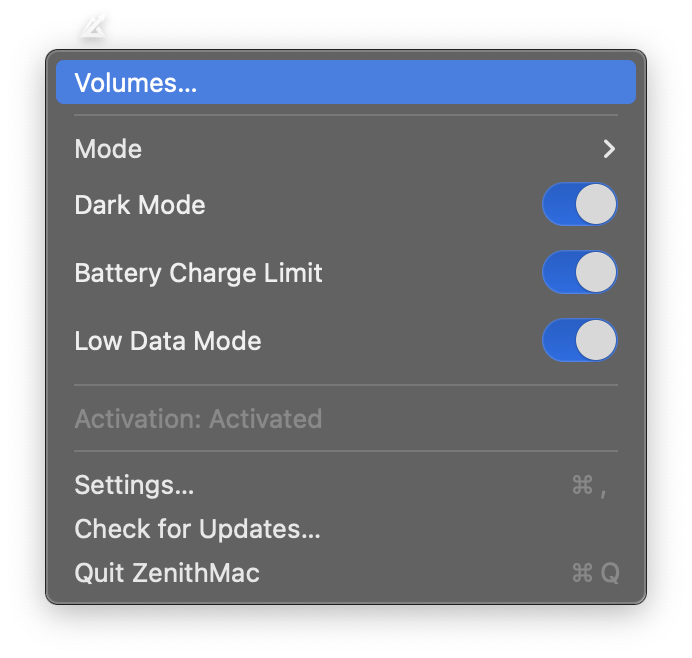
- Quick system mode switching from the menu bar
Audio Management
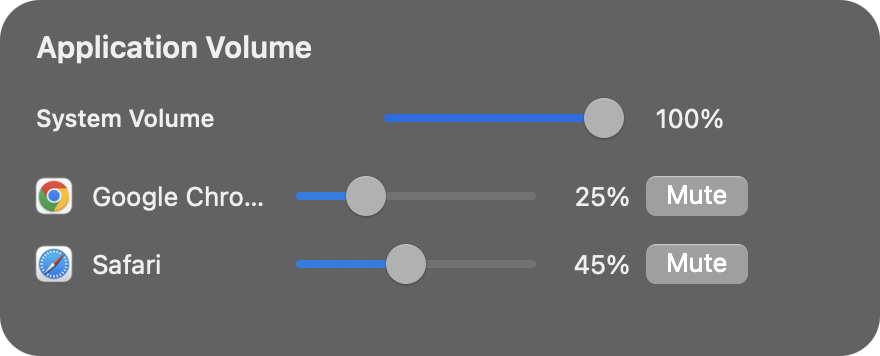
- Independent per-application volume control (0–100%)
- Individual application muting and unmuting
- Master system volume control
- Automatic detection of applications with active audio
- Remember individual application volume settings
- Control the focused application’s volume using keyboard volume keys
- Automatically control master volume when Finder or the desktop is active
- Floating volume mixer
- Floating audio controls displayed in the top-right corner
- Dynamic volume slider for the currently focused application
- Persistent volume slider while adjusting audio
- Quick access through the Volumes… menu option
- Automatically dismiss the floating mixer when clicking outside it
- Frosted-glass appearance with rounded corners
- Smooth interface transitions
- Enable or disable enhanced audio management
- Touch Bar volume control integration where supported
- Native macOS audio framework integration
Note: Advanced per-application volume controls require macOS 14.2 or newer.
Windows & Desktop
- Enhanced macOS window management
- Improved maximize behaviour
- True fullscreen window support
- Drag a window to the top of the screen to enter fullscreen
- Automatically hide the Dock and menu bar in fullscreen
- Reveal fullscreen controls at the top edge
- Restore windows to their previous size when leaving fullscreen
- Remember previous window states
- Double-tap-and-drag window interaction
- Improved handling of fullscreen and minimized windows
- Prevent unintended application termination during fullscreen transitions
Dock Enhancements
- Click an active Dock application to minimize or restore it
- Dock window previews
- Application and task progress indicators
- Dock magnification controls
- Automatic handling of applications without open windows
- Automatically quit applications when their last window closes
- Configurable no-window timeout:
- 1 minute
- 3 minutes
- 5 minutes
- 10 minutes
- 30 minutes
- 1 hour
- Improved detection of minimized and fullscreen applications
Finder Enhancements
- Native Finder integration
- Show or hide hidden files
- Windows-style file deletion
- Cut files
- Paste files
- Quickly create a New Text File
- Finder Sync extension integration
Clipboard History
- Built-in clipboard manager
- Global Ctrl + Shift + Z shortcut
- Clipboard history for text, images, and files
- Choose which clipboard content types are captured
- Text-only clipboard capture option
- Configurable history size: 10, 20, 50, 100, or 200 items
- Quickly access previously copied content
Keyboard Enhancements
- Keyboard remapping
- Global key remapping
- Per-application key remapping
- Left Option key customization
- Configure Left Option to open Launchpad
- Configure Left Option to open Spotlight
- Restore default macOS Option key behaviour
- Additional keyboard productivity shortcuts
Mouse & Trackpad
- Double-tap-and-drag support
- Mouse side-button support
- Middle-click functionality
- Middle-click auto-scroll
- Additional mouse interaction enhancements
AI Integration
- Built-in AI functionality
- OpenAI support
- Google Gemini support
- OpenRouter support
- Selectable AI provider
- Secure API-key storage
- Ask AI directly from macOS
Siri & Shortcuts
- Siri integration
- Ask AI using Siri
- macOS Shortcuts integration
- App Intents support
- AI actions accessible through Siri and Shortcuts
- Independently enable or disable Siri and AI integration
macOS & Security Convenience
- Touch ID for sudo
- Easier configuration of supported macOS security features
- System-level productivity shortcuts
- Convenient access to macOS configuration options
Permissions Management
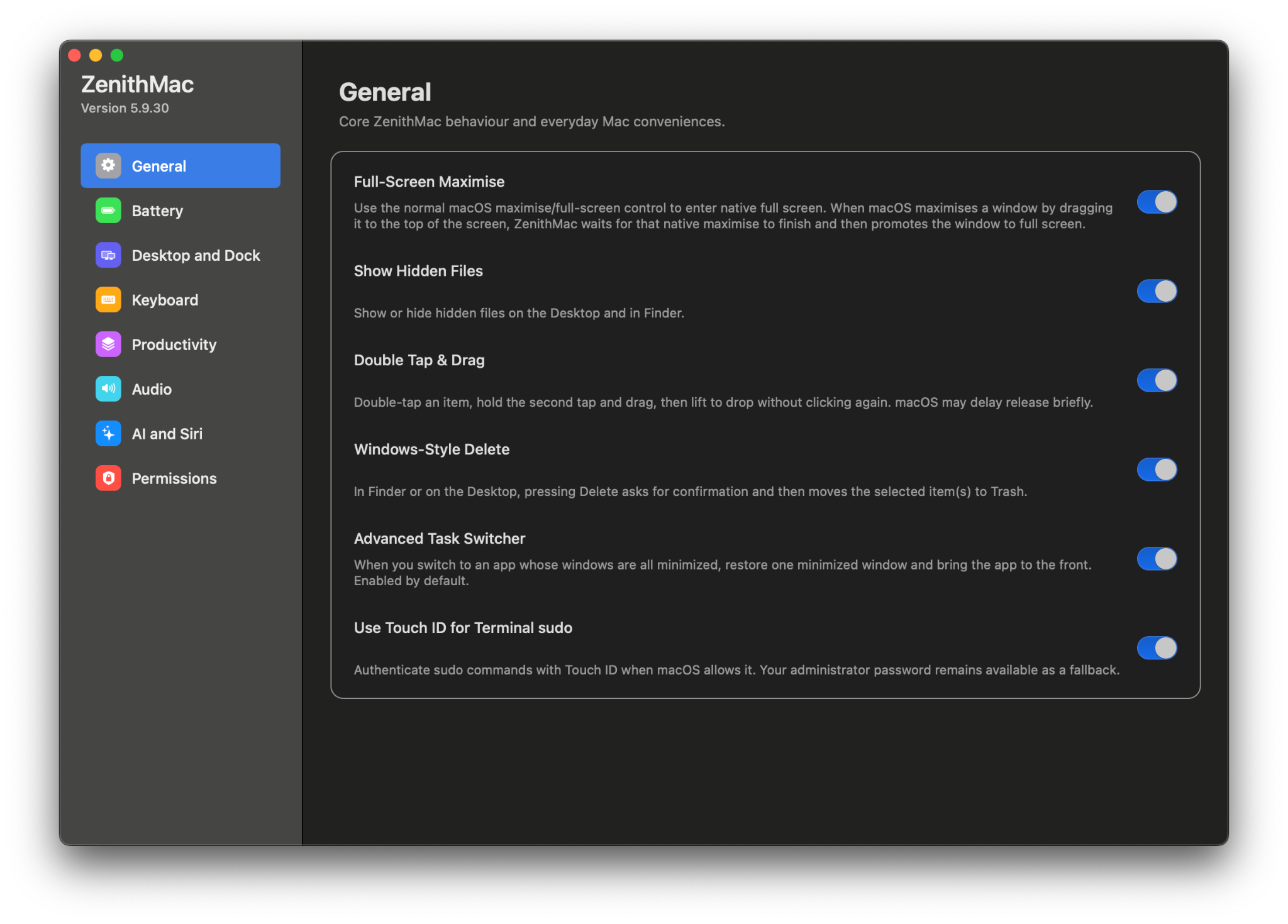
- Centralized permissions screen
- Check required ZenithMac permissions
- Accessibility permission management
- Screen Recording permission management
- Apple Events permissions
- Input and Event Monitoring permissions
- Quick access to relevant macOS System Settings pages
Startup & Background Operation
- Automatically start ZenithMac when logging into macOS
- Run primarily from the menu bar
- Lightweight background operation
- Features continue working without keeping the Settings window open
- Background license verification
- Background software update checking
- Persistent user preferences
Menu-Bar Controls
- Quickly switch between Normal, Battery Saver, and Performance modes
- Battery controls
- Charge-limit controls
- Appearance controls
- Audio management controls
- Open the floating volume mixer
- Open ZenithMac Settings
- Check for updates
- Quit ZenithMac
Appearance
- Light and dark appearance controls
- Quick theme switching
- Native macOS-style toggle controls
Updates
- Automatic update checking when ZenithMac launches
- Background update checks every 12 hours
- Manual Check for Updates… option
- Update-available notifications
- Display available version information
- Release notes
- Download new ZenithMac releases
- Versioned software releases
- Cloud-hosted update distribution
Maintenance
- Built-in ZenithMac uninstall tools
- Clean removal of ZenithMac components
- Manage login and startup integration
- Manage Finder integration
Compatibility
- Intel Mac support
- Apple Silicon Mac support
- Universal 2 application
- macOS 13 Ventura or newer
- Advanced per-application audio management requires macOS 14.2 or newer
Try it for 14 days.
ZenithMac offers a 14-day free trial and a one-device license. After purchasing, enter your license key in the app’s Activation section.
Current release: 5.9.30. Use the 14-day trial button above to download ZenithMac.